
Brains Sans Spaghetti: Custom Behavior Graphs in Unity


Custom Actions in Unity Behavior
Picture a toll gate guarded by a talking Lion. By day, it just shuffles side to side. A deer wanders past and it just sneers. A merchant who paid the toll last week, gets a slow yawn. When your cart gets close, it wakes up fully: sometimes it roars once, sometimes it charges towards you.
These are the kinds of behaviours that make a game world come to life. No magic here, though.
Unity Behavior sits in that space. Unity Behavior’s built-in nodes cover a lot of flow and timing, but when you need movement, combat, or patrol logic that fits your gameworld, you will want to write custom Actions to encode those modes.
Designers still wire graphs: boxes that run in order, split on rules, wrap children in timers or cooling off periods. A blackboard is the shared scribble pad: slots like who am I, who is the cart, what tag counts as a traveller, versus a deer just passing through.
Think of acquisition and branching in plain terms:
- Find whoever matters: Where is the nearest cart?
- Ask a simple question: Is the toll gate open? How close is the cart?
- Shuffle foot traffic to two stories: Far away? Keep looping a calm routine. Near? Allow the exciting branch.
The skeleton stays consistent. Our custom C# usually ends up only on the leaves. These leaves are Action classes we write ourselves.
Three kinds of Custom Actions we reach for
We group our custom nodes by jobs:
- Directed movement: Something needs to drift toward a doorway, a campfire, another Entity. Real games add noise: pathfinding quirks, snapping feet to ground, sprint vs walk, a short pause once you arrive so sensors do not jitter between “done” and “not quite.”
- Ambient motion: A statue could pace a ring around spawn. A sheepdog could orbit the herd. Same idea: sample points, breathe, repeat. Often these actions stay
Runningforever on purpose. A parent control node above them chooses when to rip the actor out of reverie via timeouts & branch refreshes. - Gameplay intents: A single bellow, a swung club, dipping a paintbrush. Small nodes that poke our existing combat or animation pipelines. Thin glue that interfaces with existing systems.
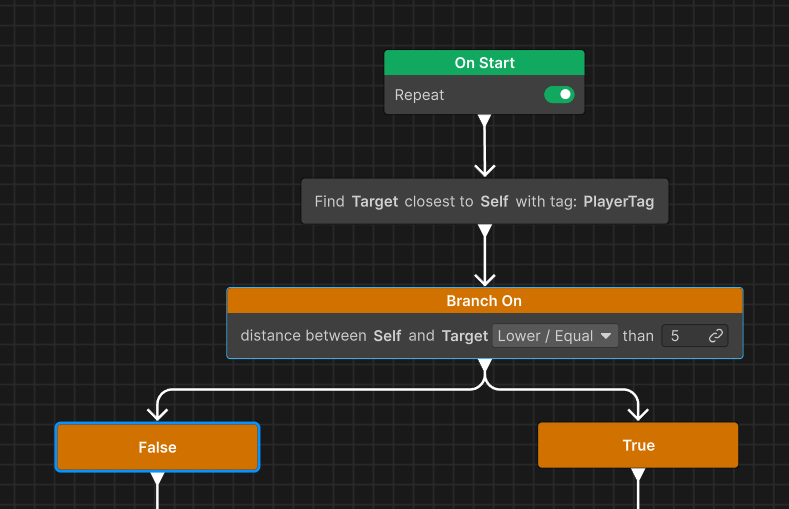
FindClosestWithTag → BranchingCondition → false arm “patrol” / true arm “engage”Authoring Custom Actions
Unity Behavior discovers Actions as subclasses of Action with the usual authoring attributes. A minimal node that only validates wiring might look like:
[Serializable, GeneratePropertyBag]
[NodeDescription("Ping", category: "Action", id: "...")]
public class PingAction : Action // Unity.Behavior.Action
{
    [SerializeReference] public BlackboardVariable<GameObject> Self;

    protected override Status OnStart() =>
        Self.Value ? Status.Running : Status.Failure;

    protected override Status OnUpdate()
    {
        Debug.Log("tick", Self.Value);
        return Status.Success;
    }

    protected override void OnEnd() { }
}
A realistic leaf in our project looks more like:
using System;
using Unity.Behavior;
using Unity.Properties;
using UnityEngine;
using Action = Unity.Behavior.Action;

[Serializable]
[GeneratePropertyBag]
[NodeDescription(
    "NavMesh Move To GameObject",
    story: "[Agent] moves on NavMesh toward [Target]",
    category: "Action",
    id: "a1b2c3d4e5f6478a9b0c1d2e3f4a5b6")] // stable id matters for graphs
public class NavMeshMoveToGameObjectAction : Action
{
    [SerializeReference]
    public BlackboardVariable<EnemyController> Agent;

    [SerializeReference]
    public BlackboardVariable<GameObject> Target;

    public float minimumArrivalDistance       = 0.75f;
    public int   frameDelayForArrivalComplete = 6;
    public bool  shouldSprint                 = true;
    public float navMeshSampleMaxDistance     = 2f;
    public bool  sampleDestinationOntoNavMesh = true;

    private int _stopFrames;

    protected override Status OnStart()
    {
        if (Agent.Value == null) { LogFailure("No agent provided."); return Status.Failure; }
        if (Target == null)     { LogFailure("No Target variable bound."); return Status.Failure; }
        _stopFrames = 0;
        return Status.Running;
    }

    protected override Status OnUpdate()
    {
        if (Target.Value == null) return Status.Failure;

        EnemyController ctrl = Agent.Value;
        if (ctrl == null) return Status.Failure;

        Vector3 goal = Target.Value.transform.position;
        var nav      = ctrl.NavMeshAgent;

        // Pathfinding drives the arcade motor via desiredVelocity (server-side setup).
        if (nav != null && nav.enabled && nav.isOnNavMesh)
        {
            Vector3 dest = goal;
            if (sampleDestinationOntoNavMesh
                && NavMeshMoveHelper.TrySampleOntoNavMesh(goal, navMeshSampleMaxDistance, out var onMesh))
                dest = onMesh;

            nav.SetDestination(dest);
            ctrl.ApplyNavMeshDesiredVelocityToMotor(shouldSprint, 1f);
        }
        else
        {
            Vector3 delta = goal - ctrl.transform.position;
            float xz = NavMeshMoveHelper.HorizontalDistanceXZ(goal, ctrl.transform.position);

            if (xz > minimumArrivalDistance)
            {
                _stopFrames = 0;
                float cap = shouldSprint ? ctrl.SprintSpeed : ctrl.MoveSpeed;
                ctrl.HandleMotionIntent(new Vector2(delta.x, delta.z).normalized, cap, false);
            }
            else
            {
                ctrl.HandleMotionIntent(Vector2.zero, 0f, false);
                _stopFrames++;
                if (_stopFrames > frameDelayForArrivalComplete)
                    return Status.Success;
            }
            return Status.Running;
        }

        // NavMesh branch: same XZ threshold + settle frames before Success
        float dist = NavMeshMoveHelper.HorizontalDistanceXZ(goal, ctrl.transform.position);
        if (dist > minimumArrivalDistance) { _stopFrames = 0; return Status.Running; }

        ctrl.HandleMotionIntent(Vector2.zero, 0f, false);
        _stopFrames++;
        return _stopFrames > frameDelayForArrivalComplete ? Status.Success : Status.Running;
    }

    protected override void OnEnd() { }
}
EnemyController and NavMeshMoveHelper are our game types.
A real march toward a goal behaves more like narrative beats: guard refs in OnStart, simulate one step each OnUpdate, cleanup if the graph steals control in OnEnd.
C# vs Staying in the editor
Rules we rely on repeatedly:
- Prefer built-ins for branching and scheduling:
SequenceComposite,RandomComposite,CooldownModifier,TimeOutModifier,CheckDistanceCondition, tagging searches - anything that composes cleanly from blackboard data. - Write an Action when we must execute game-specific vertical slices:
- how our agent couples NavMesh steering to rigidbody-backed motion
- patrol geometry our designers tune per enemy flavor
- firing an attack intent that already hides replication and cooldown elsewhere
We have not authored custom conditions yet. Stock CheckDistanceCondition (plus operators on the threshold) covers our coarse “near vs far”; richer perception would be the first place we’d add a Condition subclass instead of cramming branching into OnUpdate.
On our game we drew a line early: movement-ish actions poke one surface, attack-ish actions poke another. Graphs stop caring about internals. Patrol nodes that never finish pair with timeouts so the Lion wakes up regularly and rechecks the road.
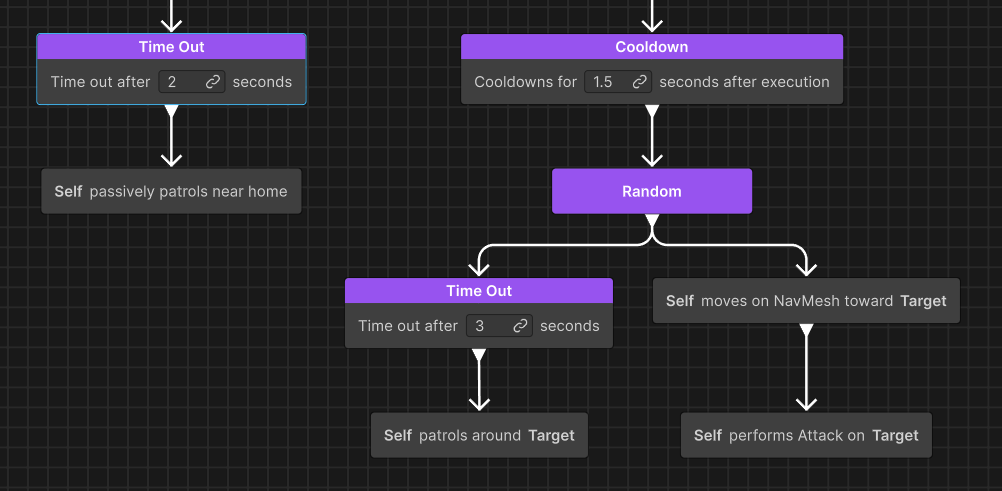
One strong stack
Suppose the Lion loops a slow orbit forever if nobody is close. Alone, TimeOutModifier solves monotony. Let it haunt for four seconds then wake and rerun the distance check. The carts have not vanished. Logic is still honest.
Suppose the awake branch fires too often. CooldownModifier caps how often the whole aggro mode reruns. RandomComposite can swap between prowl at range (long-running move) and charge (SequenceComposite: close, then roar).
That picture is almost all wiring in the graph editor. BranchingConditionComposite, timeouts, cooldowns, random picks. Action code only paints how the wandering, charging, and roaring feel on our rigs.